How To Use An AI Description Generator For E-Commerce

To use an AI description generator well, feed it every piece of product data you have, give it a clear structure to follow, review a sample before you publish, and automate the process once the output is reliable. Small stores can do this by hand with a chat tool. Stores with hundreds or thousands of products need a generator connected directly to the catalog.
This guide covers both: what an AI product description generator actually is, how to get good output from it, how to use it manually, and how to automate it at scale.
What is an AI product description generator?
An AI product description generator is a tool built on a large language model (LLM) that turns product data (title, specifications, category, attributes) into a written product description. Many tools on the market are simply a fixed prompt sent to a general-purpose model. Tools built for e-commerce go further: they read your catalog data, apply a consistent structure, and send the result back to your store.
A good product description does three jobs at once:
- Informs: it keeps every important detail from the specifications (size, material, compatibility, variants).
- Sells: it explains benefits, not only features, so the shopper can decide quickly.
- Ranks: it is structured with headings and relevant keywords, so the product page can attract search traffic on its own.
If you are wondering whether this kind of content can rank at all, read are AI descriptions good for SEO.

Step 1: Feed it as much context as you can
Context decides the quality of the output. A generator that only sees a product title can only guess. OpenAI’s own prompt engineering guide makes the same point: models perform better when you include the context, data and logic the task requires.
Give the generator everything you already have:
- the existing description, even if it is short or poorly written;
- the specifications list or attribute table;
- category, tags, brand and variants (sizes, colors);
- anything else that is true and relevant: materials, care instructions, what is in the box.
Can it write a good description from the title alone?
Sometimes. Many marketplace-style titles already contain the specifications. Take this one:
Acer Nitro V Gaming Laptop | Intel Core i7-13620H Processor | NVIDIA GeForce RTX 4050 Laptop GPU | 15.6″ FHD IPS 165Hz Display | 16GB DDR5 | 1TB Gen 4 SSD | Wi-Fi 6 | Backlit KB | ANV15-52-76NK
A good generator can build a complete, accurate description from that line, because the facts are all there. A title like “Gaming Laptop” or “Pear Phone 8S” is a different story: no tool can describe what it was never told, and a model asked to fill the gaps may invent details. The rule is simple: the less data you provide, the more you must check.
Step 2: Give it a structure to follow
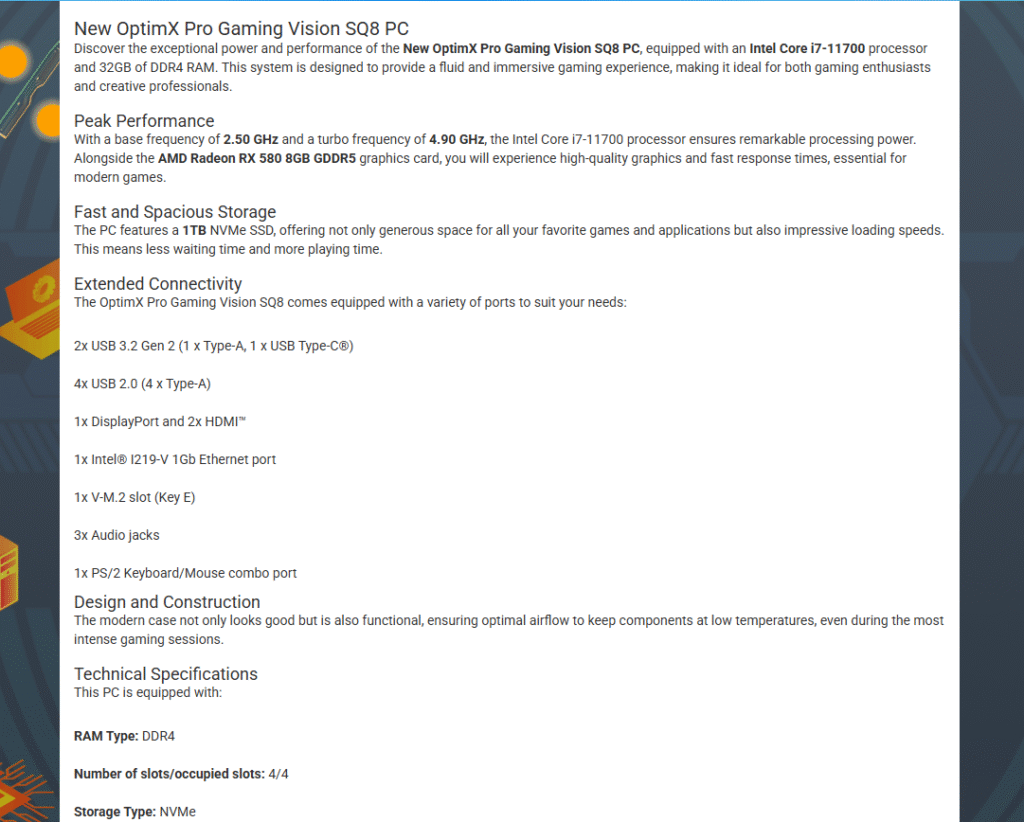
Decide once what every description should look like, then ask for exactly that. A useful default for most stores:
- a short opening paragraph that names the product and its main benefit;
- two to four sections with subheadings (H3 or H4), one per feature group;
- the most important keywords in bold, used naturally;
- a bullet list of key specifications;
- short sentences and plain vocabulary.
Put the essential information first. Google’s Merchant Center description guidelines advise keeping key details in the first 160 to 500 characters, because shoppers often see only that part before they click.

How to use an AI description generator manually
For a small store with a few dozen products, a chat tool such as ChatGPT is a reasonable start. You copy the product data in, copy the description out, and paste it into your store. Here is a prompt you can adapt:
Your job is to write an e-commerce product description that sells and is optimized for SEO.
Product title: [INSERT PRODUCT TITLE]
Product specifications: [INSERT SPECIFICATIONS]
Extra details: [INSERT ANY OTHER RELEVANT FACTS]
Structure the description into several sections with H3 to H5 headings, bold the main keywords, use short but complete sentences and easy-to-read vocabulary. Use only the facts provided; do not invent features.
The last sentence matters. It reduces the risk of the model adding features your product does not have.
The manual method has clear limits. Every product means two rounds of copy-paste, the quality varies from one chat to the next, and it does not scale past a few dozen items. If you prefer a dashboard to a chat window, see how to generate a product description with Ovesio manually.

How to generate product descriptions automatically
For medium and large stores, with hundreds or thousands of products and new ones added every week, manual work stops being an option. This is where an automatic generator connected to your store pays off.
The workflow usually looks like this:
- Connect the catalog. Install a plugin for your platform or call the generator’s API from your own system.
2. Generate for existing products. Run the generator over the products that have missing or weak descriptions.
3. Review a sample. Check a batch from each category before you publish everything.
4. Automate new products. Send each new product to the generator when it is added, through the plugin or an API call, so the catalog never falls behind again.
Ovesio’s AI description generator follows this model. It has plugins for WordPress/WooCommerce, OpenCart, PrestaShop and Magento, plus a REST API, a PHP SDK and Swagger documentation for custom stores (see Ovesio integrations). If your product data lives on another website, the Smart AI Import feature can pull it from a URL into the dashboard; this guide to the Smart URL AI extractor shows how.
Two related tasks fit the same workflow. Ovesio can also generate SEO meta tags for each product (see how to generate SEO-ready meta tags), and its AI Translation can then translate the descriptions into 30+ languages if you sell abroad.
On pricing, the Ovesio Basic plan starts at €69 per month (VAT excluded) with 40,000 credits and covers descriptions and meta tags; the Standard plan’s 85,000 credits correspond to roughly 3,300 descriptions per month. There is a 7-day free trial with no card required.

Review before you publish
Automation does not remove responsibility for what appears on your product pages. Google’s guidance on generative AI content says AI content is acceptable when it meets its quality standards, but recommends fact-checking AI output before publishing and warns that generating many pages without adding value for users may count as scaled content abuse.
A practical review routine:
- check facts against the specifications, especially numbers, materials and compatibility;
- remove claims you cannot back up (health, safety, “best on the market”);
- make sure similar products do not end up with near-identical text;
- re-check categories where errors would be costly (technical, regulated or high-value items).
For a closer look at where AI copy works and where it does not, read eCommerce AI product descriptions: good or bad?
Choosing the right generator
General-purpose writing tools can produce decent descriptions, but they are built around a chat window, not a catalog. If you sell online, look for a tool that reads your product data, keeps a consistent structure and publishes back to your store without copy-paste. Our comparison of the best AI description generators for e-commerce covers free options, SEO features and tools for large catalogs.
Conclusion
Using an AI description generator well comes down to four habits: give it all your product data, define the structure you want, review the output, and automate once the results are reliable. Do it by hand while your catalog is small; connect a generator to your store when it grows.
Want to try it on your own catalog? Start a 7-day free trial of the Ovesio AI description generator, no card required.