Credits: How Ovesio’s Pricing Model Works

Ovesio bills usage in credits. Each subscription plan adds a fixed number of credits every month (40,000 on Basic, 85,000 on Standard, 149,000 on Advanced), and you spend them on any mix of AI translations, product descriptions and SEO meta tags. How many credits a task uses depends on how much text is processed, how many languages you translate into and which workflow you choose. eCommerce Intelligence reports are included separately and do not use credits.
What a credit is
A credit is Ovesio’s single unit of usage. Behind the scenes, one translation can call Google Translate, Microsoft Translator, DeepL Pro, OpenAI and Gemini, each priced differently by its provider. Instead of passing those prices on to you as tokens or characters per engine, Ovesio converts everything into credits. You see one balance, one usage report and one invoice, whatever engines your workflow uses.
Credits are shared across features. On Standard and Advanced the same balance pays for translations, descriptions and meta tags; on Basic, which does not include translation, it pays for descriptions and meta tags.
What affects translation credits
The Ovesio cost calculator lists five factors:
- Text volume. Consumption follows the total number of characters, counted after UTF-8 conversion. HTML tags in the text count as extra characters, so markup-heavy descriptions cost more than clean text.
- Number of target languages. Each additional language uses additional credits, so consumption grows in proportion to the languages you select.
- Dictionary rules. Words you ask Ovesio to replace or ignore add processing and can add credits.
- Context text. Context you send with a request to improve accuracy is counted as part of the character volume.
- Workflow. Running several engines and letting the AI Inspector pick the best result uses more credits than a single engine, because more processing happens.
UTF-8 is the standard encoding for web content (the W3C explains it here), so for most stores the main levers are simply less markup, fewer unnecessary languages and a workflow that matches the importance of the content.
What affects description and meta tag credits
For AI product descriptions, credits depend on the characters you send (name, categories, specifications, HTML included) and on the length of the result. More detailed input produces longer, more relevant descriptions, and longer descriptions use more credits. For products, Ovesio generates descriptions of up to 150 words.
For SEO meta tags, credits depend on the input text and on how many tags you generate. A full set covers H1, H2, H3, meta title, meta description and meta keywords; asking for the full set uses more credits than a title and description alone (see how to generate meta tags in Ovesio). Unique tags per product are worth it: Google’s snippet guidelines say identical descriptions across pages are not helpful in search results.
What does not use credits
- eCommerce Intelligence reports, which have their own monthly allowance per plan (1,000, 5,000 or 50,000).
- Duplicate requests, which are skipped automatically (you can turn this off).
- Retries. If a request fails, Ovesio retries it up to three times and charges it only once.

What each plan buys: examples
The pricing page translates each plan’s credits into typical volumes. Each figure is an alternative, not a total:
| Plan (monthly) | Credits | Translated characters | Descriptions | Meta tag sets |
|---|---|---|---|---|
| Basic, €49 | 40,000 | Not included | ~1,500 | ~3,300 |
| Standard, €89 | 85,000 | ~3.9M (~2,600 products) | ~3,300 | ~7,100 |
| Advanced, €149 | 149,000 | ~7.3M (~4,900 products) | ~5,700 | ~12,400 |
Product estimates assume about 1,500 characters per product. Some worked examples using those figures:
- 1,000 products into two languages. That is about 1,000 × 1,500 × 2 = 3 million characters a month, which fits Standard’s ~3.9 million.
- 1,000 products into four languages. About 6 million characters: above Standard, within Advanced’s ~7.3 million.
- A mix on Advanced. Spending half the 149,000 credits on translation and half on descriptions gives roughly 3.6 million translated characters plus about 2,800 descriptions.
- A single-language store on Basic. 40,000 credits cover about 1,500 new descriptions, or around 750 descriptions plus 1,650 meta tag sets.
These are estimates. Actual consumption varies with your workflow, markup and the complexity of the generated content, which is why the next step matters.
Estimate and track your usage
Before a large job, paste a typical product into the cost calculator, select your target languages and engines, and multiply the estimate by the number of products. The cost calculator guide walks through it field by field. In the app, the meta tag generator, for example, shows the estimated credits before you save.
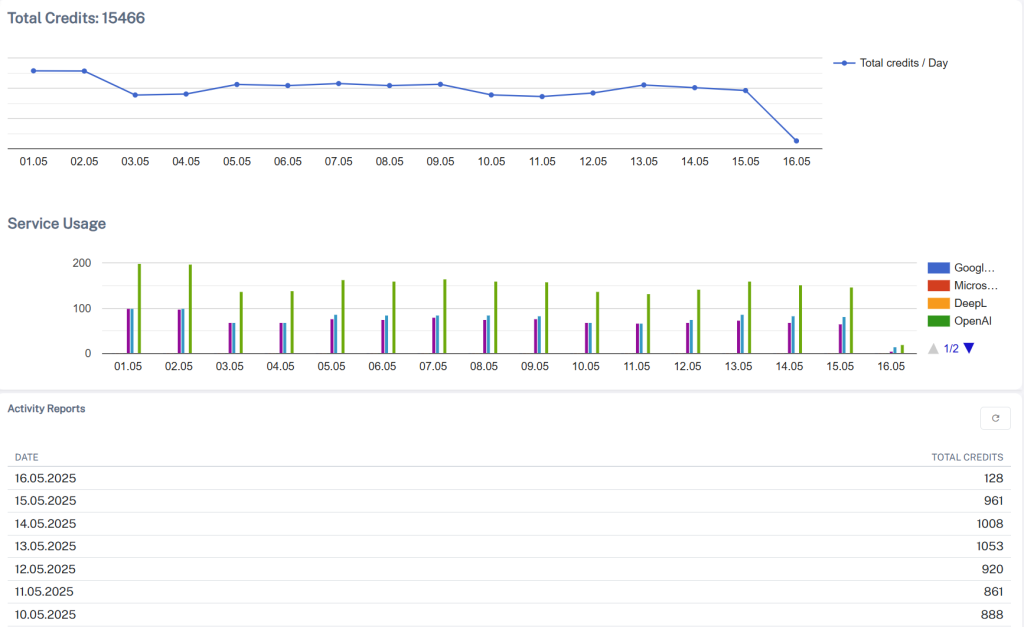
Once you are running, the usage reports show total credits per day, usage per translation engine and daily activity totals, so you can see which engines and which days drive consumption.
Plan credits and extra credits
Plan credits are tied to your subscription period. If you need more in a busy month, buy extra credits from the dashboard at €0.001 per credit: 10,000 credits cost €10 and 50,000 cost €50. Extra credits stay valid for one year from purchase and require an active subscription.
Extra credits suit occasional peaks, such as a catalog launch or a new market. If you top up every month, compare plans in how to pick the right subscription plan; the next tier is usually the better deal.
How to spend fewer credits
- Clean inline styles and unnecessary HTML out of descriptions before sending them.
- Use pre-defined translations for repeated phrases such as shipping notes or attribute values, so the same text is not translated twice.
- Keep the multi-engine workflow with AI Inspector for customer-facing text, and a lighter workflow for internal or low-traffic content.
- Translate only the languages of markets you actually sell to.
The fastest way to learn your real cost per product is to test it. Start the 7-day free trial from the pricing page (no credit card), run a sample of your catalog and check the usage report.