Google Translate API Pricing for Online Stores: What You Really Pay
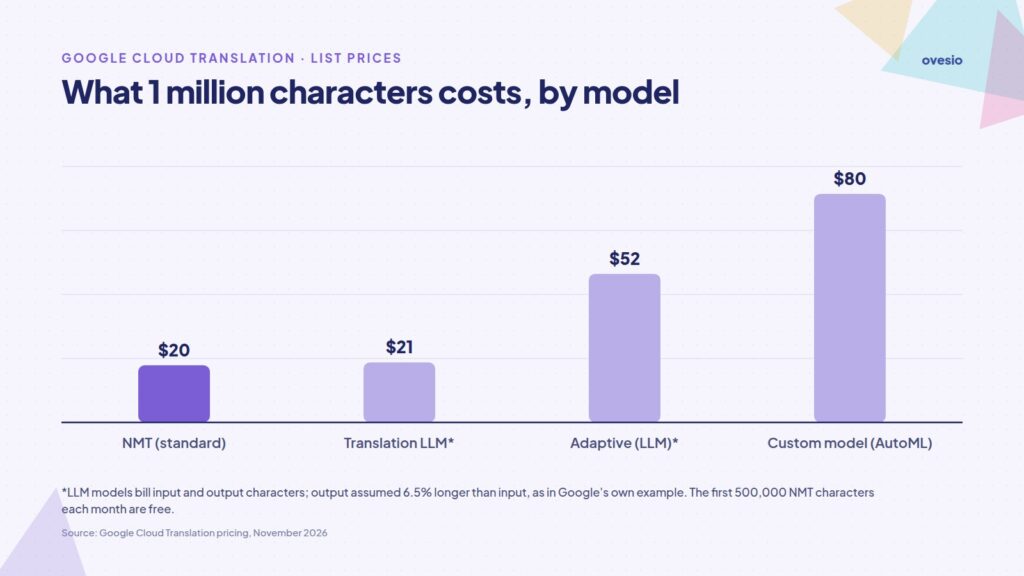
Short answer: Google Translate API pricing starts at $20 per million characters for the standard NMT model, and the first 500,000 characters each month are free (a $10 monthly credit). Google’s Translation LLM costs $10 per million input characters plus $10 per million output characters, adaptive translation $25 + $25, and custom models $80 per million. For an online store, the real bill depends on three things: how many characters your catalog has, how many languages you translate it into, and how much HTML you send along with the text.
Prices below are Google’s published list prices in US dollars, checked on the official Cloud Translation pricing page in November 2026. At the end we show what the same job costs with Ovesio AI Translation, which uses Google Translate as one of its engines.
- You pay per character, for every target language. A catalog translated into five languages is billed five times.
- HTML tags and spaces are billed too. On a formatted product description, HTML tags can add more than 40% to the characters you pay for.
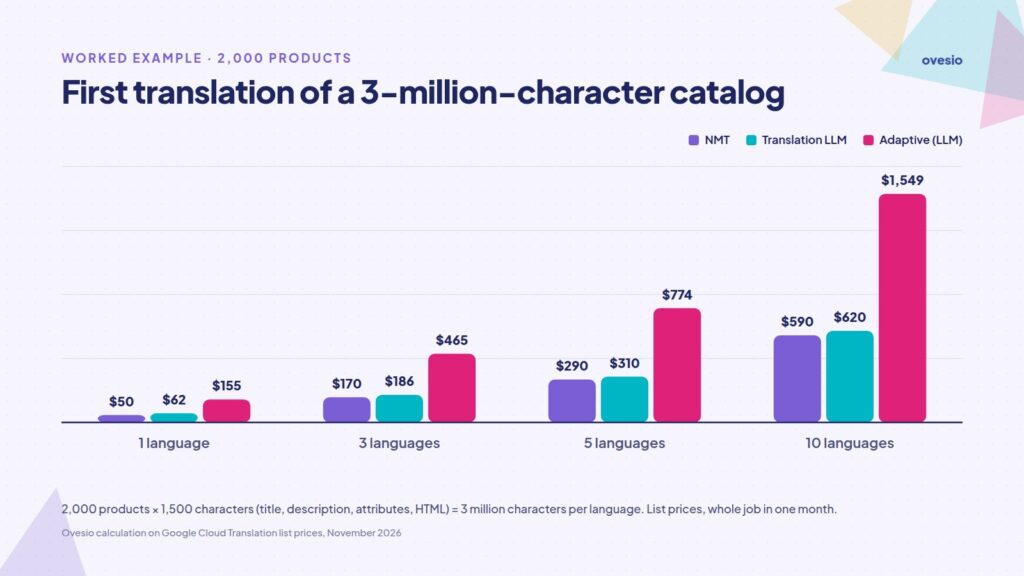
- A 2,000-product catalog in five languages costs about $290 with NMT, or about $310 with Translation LLM, for the first translation.
- The API price leaves out the work around it: integration, re-translating edited products, quality checks and SEO meta tags. That work often costs more than the API itself, and it’s the part Ovesio handles.
Google Translate API pricing in 2026
Google sells machine translation through Cloud Translation, in two editions: Basic and Advanced. The price depends on the model you call, not on the edition. These are the list prices for text:
| Model | What is billed | Price (USD) |
|---|---|---|
| NMT (standard model) | characters sent | first 500,000 a month free, then $20 per million |
| Translation LLM | input + output characters | $10 per million + $10 per million |
| Adaptive translation (LLM) | input + output characters | $25 per million + $25 per million |
| Custom model (AutoML) | characters sent | $80 per million, lower at very high volume |
| Documents: DOCX, PPT, PDF (NMT) | pages | $0.08 per page |
Basic or Advanced: which edition do you need?
Basic gives quick access to the standard NMT model and is fine for a test or for short texts. Advanced adds what a real catalog needs: glossaries (so brand names and technical terms are always translated the same way), batch and document translation, the Translation LLM model, adaptive translation and custom models. Google lists the differences in its edition comparison. Creating a glossary is free; you only pay for the characters translated with it.
What you are actually billed for
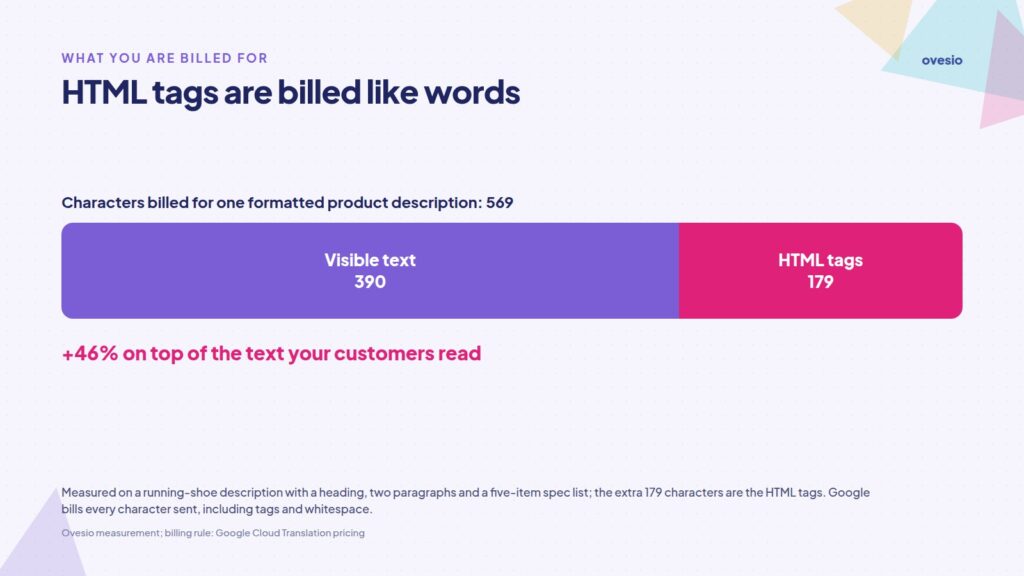
Google bills every character in a request, including whitespace and characters that are not translated. Its own example: <p>こんにちは</p> counts as 12 characters, although the text is only 5. Even an empty request is billed as one character.
For an online store, that makes formatted product descriptions more expensive than their text suggests. We measured a typical running-shoe description with a heading, two paragraphs and a five-item spec list: 390 characters of visible text and 569 characters billed. That is 46% extra, just from the HTML tags. The share drops on long descriptions, but it does not disappear.
Two more rules change the total:
- Every target language is billed separately. In batch translation, Google multiplies the source characters by the number of target languages.
- Language detection is free when you ask for a translation without naming the source language; you only pay for the text you send.
A worked example: 2,000 products in five languages
Take a store with 2,000 products and about 1,500 characters of title, description and attributes per product, HTML included. That is 3 million source characters. Translating it into five languages (German, French, Italian, Spanish and Polish) sends 15 million characters to the API.
| Model | Calculation | Estimated cost (first translation) |
|---|---|---|
| NMT | (15M − 0.5M free) × $20 | ≈ $290 |
| Translation LLM | 15M × $10 + ≈16M output × $10 | ≈ $310 |
| Adaptive translation | 15M × $25 + ≈16M × $25 | ≈ $774 |
| Custom model | 15M × $80 + training | ≈ $1,200 + up to $300 |
After the first run come the updates. If 10% of the catalog changes every month, you resend about 1.5 million characters across the five languages: roughly $20 a month with NMT after the free 500,000. The cost is small. The work isn’t: something has to detect what changed and resend exactly those texts.
Limits and quotas to plan for
From Google’s quotas and limits page:
- Google recommends keeping requests under 5,000 characters. Advanced accepts up to 30,000 characters per request, Basic up to 100 KB.
- The default limit is 6 million characters per minute for the general model, with no daily cap. If you’re on a fixed budget, Google recommends monitoring daily usage and adjusting quotas.
- Custom models have a lower default limit of 100,000 characters per minute.
In practice, texts longer than 5,000 characters should be split or sent through batch translation, and large product imports need to be throttled.
How it compares with Amazon Translate and Microsoft Translator
The closest alternatives work the same way, billing per character, with different free tiers. Amazon Translate charges $15 per million characters and includes 2 million free characters a month for the first 12 months (AWS pricing). Microsoft Translator‘s free F0 tier covers 2 million characters a month; paid rates are on the Azure pricing page.
The price gap between these services matters less than translation quality in your languages, and no single engine wins everywhere. We compare them in the best Google Translate alternatives for e-commerce and the best AI translation services.
What the API price does not include
The API returns translated text, and that is all. To run a multilingual store you also need:
- Integration: code that reads products, sends them in chunks, writes translations back and handles errors and retries.
- Sync: detecting new and edited products, so you never re-translate the whole catalog.
- Quality control: a single engine sometimes gets terms, units or tone wrong, and someone has to catch it.
- SEO: a meta title and meta description for every language, not just a translated description.
It is worth doing, because shoppers want to buy in their own language: in a CSA Research survey of 8,709 consumers in 29 countries, 76% preferred products with information in their own language and 40% never buy from websites in other languages.
How Ovesio uses Google Translate, and what it adds
Ovesio AI Translation is built for exactly the work the API leaves to you. Google Translate is one of its engines, next to DeepL, Microsoft Translator, OpenAI and Gemini. Ovesio sends each text to the engines in your workflow, and its AI Inspector keeps the best parts of each version.

- No integration project: plugins for WooCommerce, PrestaShop, OpenCart and Magento, or an API with a PHP SDK if you run a custom store. The WordPress plugin guide shows the setup step by step.
- Automatic updates: edit the original product and the translations update too.
- Glossary-style rules: keep brand names untranslated, lock in recurring terms, and avoid paying twice for the same text (duplicate requests are detected and not translated again).
- Errors don’t cost you extra: failed requests are retried up to three times and charged once.
- More than translation: the same credits cover multilingual SEO meta tags and AI product descriptions, in 30+ languages.
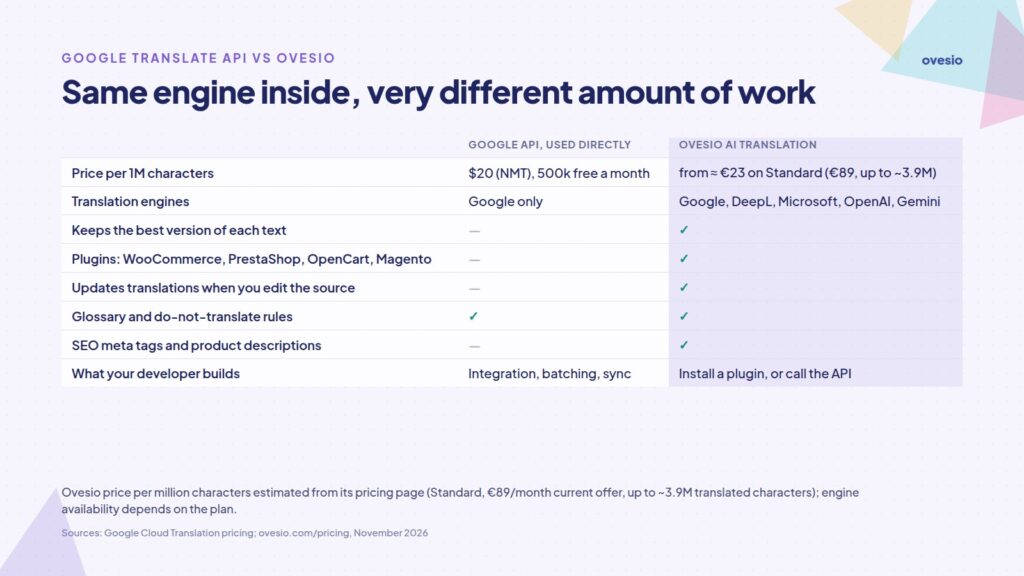
What it costs: Ovesio bills in credits, not per character. By the estimates on the Ovesio pricing page, the Standard plan (€89 a month on the current offer, €109 list price) covers up to about 3.9 million translated characters. That works out to about €23 per million characters at best, a little above Google’s raw NMT rate of $20, with the AI Inspector and the plugins included. Credit use depends on your workflow: the fewer engines you run, the further your credits go. For the 15 million characters in our example, the Advanced plan (€149 a month on the current offer, €169 list price, up to about 7.3 million characters) plus extra credits at €0.001 each comes to roughly €306 for the first translation, by the same estimates. Exact usage depends on text length, languages, and workflow; the cost calculator estimates it for your own catalog. The details are in how Ovesio credits work and how to pick a plan.
A real-world example: ComputerShop.eu translated 4,500 products with Ovesio for €4,521, compared with an estimated €1,417,500 with human translators, according to Ovesio’s About page.
Which option fits your store?
- Use the Google API directly if you have a developer, a small catalog, one new language and time to build and maintain the integration.
- Use Ovesio if you sell in several languages, update products often, or run WooCommerce, PrestaShop, OpenCart or Magento and want translations, SEO meta tags and updates handled for you. Monthly plans start with a 7-day free trial, no credit card required.
FAQ
Is the Google Translate API free?
Partly. Under Google Translate API pricing, the first 500,000 characters translated each month with the NMT model are covered by a $10 credit that does not roll over. Above that you pay $20 per million characters, and you need a Google Cloud account with billing enabled.
How much does it cost to translate 1,000 products?
At 1,500 characters per product, 1,000 products come to 1.5 million characters per language. With NMT, the first language costs about $20 after the free allowance, and each additional language about $30.
Is Translation LLM better than NMT?
Translation LLM is Google’s newer model, built on a large language model and available only in the Advanced edition. The practical difference in cost is that you pay for both the text you send and the text you get back. For repetitive product data, NMT with a good glossary is often enough; for marketing copy, test the LLM on a sample. Our article on translating with ChatGPT covers LLM translation in more depth.
Are HTML tags billed?
Yes. Google bills every character you send, tags and whitespace included. Send only the fields that need translating, and strip unnecessary markup such as inline styles pasted from editors.
Sources
- Google Cloud, Cloud Translation pricing (accessed November 2026)
- Google Cloud, Cloud Translation quotas and limits
- Google Cloud, Compare Cloud Translation editions
- Amazon Web Services, Amazon Translate pricing
- Microsoft Azure, Translator pricing
- CSA Research, Consumers Prefer their Own Language (July 2020)
- Ovesio, pricing and About pages (accessed November 2026)